#1 AI Image Editor & Generator — GPT Image 1.5
Quit complex Photoshop/Canva workflows. Generate, edit, and fine-tune images in seconds with precise instruction following, cleaner text rendering, and up to 4× faster results.
Create & Edit AI image with GPT Image 1.5
Support both text-to-image and image editing, powered by GPT Image 1.5.
Upload and edit existing images
Showcase
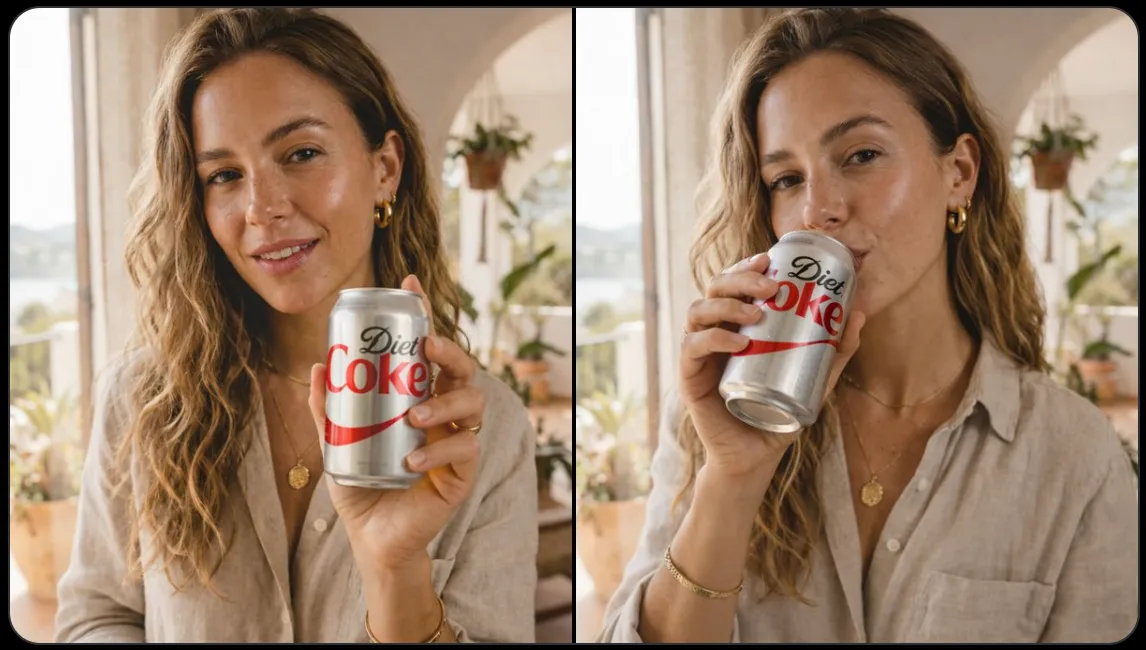
Make the woman start drinking a Coca-Cola. Preserve the original image style, lighting, and composition.
See the Power of GPT Image 1.5 for Editing & Generating
Watch GPT Image 1.5 create stunning edited images with incredible precision and style.
Why Choose GPT Image 1.5 for Image Generation & Editing?
GPT Image 1.5 delivers precision, consistency, and speed for all your image creation needs.
Precision Edits, Detail Preserved
Changes only what you ask—while keeping lighting, composition, and facial likeness consistent across edits.
Stronger Instruction Following
Handles complex multi-object layouts and relationships more reliably, so results match your intent.
Crisper Text Rendering
Produces cleaner, denser, smaller text—great for posters, infographics, and UI-style mockups.
Up to 4× Faster Image Generation
Iterate rapidly with dramatically shorter wait times, making creative exploration feel effortless.
What Is GPT Image 1.5 Good For?
Use cases where GPT Image 1.5's precision, consistency, and text rendering shine.
Photo to Sketch
Convert portraits or product shots into clean sketches while preserving key contours, proportions, and recognizable details for a consistent, polished look.
Change People in the Image
Adjust clothing, hairstyle, pose, or expression while keeping the person's identity, lighting, and overall scene style coherent across edits.
Add / Change Text for Images
Create posters, labels, thumbnails, and UI mockups with sharper small text and cleaner layout—ideal for marketing and design iterations.
Turn Images into Any Style
Reimagine photos in anime, watercolor, cinematic, 3D, or retro styles while maintaining the original composition and important visual cues.
Remove Objects or People
Erase distractions (logos, clutter, strangers) with natural-looking fills that respect background texture, perspective, and lighting.
Virtual Try-On
Preview outfits and accessories with more believable edits—keeping body proportions and fabric behavior more realistic across variations.
Edit & Generate Your Image in 3 Easy Steps
Type a prompt or upload an image and get results in seconds—skip the complicated layers, masks, and timelines. GPT Image 1.5 turns your intent into clean edits fast.
Describe what you want, or upload a photo to edit with a clear instruction.
Request changes like remove objects, add text, change style, or try on outfits in GPT Image 1.5.
Export instantly, then refine with another quick instruction for perfect results.
Pricing
Choose the plan that works best for you. Each GPT image 1.5 generation costs 10 credits
Free
- 20 credits free
- Handle 1 task at a time
- Don't support batch image editor
- Limited support
Starter
- 1000 credits per month
- Handle up to 2 tasks at the same time
- Support batch image editor
- Limited features
Professional
- 3000 credits per month
- Handle up to 5 tasks at the same time
- Support batch image editor
- Limited features
- Commercial usage rights
Business
- 8000 credits per month
- Handle up to 10 tasks at the same time
- Support batch image editor
- 24/7 priority mail support
- Commercial usage rights
Frequently Asked Questions
Everything you need to know about GPT Image 1.5.
GPT Image 1.5 began rolling out in mid-December 2025 (12/16/2025), with availability expanding to more users over time depending on platform and plan.